
Printer Emulators
One of the benefits of the Retro-Printer module is that we can create our own printer emulators / printer simulators in the C programming language, using a common library which we have created for many of the standard functions, turning the module into a fully-fledged virtual printer.Originally, the Retro-Printer was designed to emulate an EPSON printer as this was seen as the industry standard and simplest to implement for handling of plain text and were one of the most common printer types used by retro-computer enthusiasts in the 1980s and 1990s.
Printer Control Codes
Whilst the first computer printer may have been a mechanically driven apparatus designed by Charles Babbage for his Difference Engine in the 19th century, it was not untl 2000 when the Science Museum in London completed building this printer to automatically prints the results of a calculation performed by the Difference Engine. The initial design shows just how important being able to print from a computer was perceived, even if it did not become a reality until 1968, when Epson (Shinshu Seiki Co.) created the tiny EP-101 to print out the times which the Seiko Group had gathered from the timepieces used for timekeeping in the 1964 Tokyo Olympic games.
As the printer industry developed in the 1970s-1990s, various manufacturers realised that through the addition of printer control codes to improve the mainly plain text data seen in early word-processing software and enhance its printed output. The switch from 7 bit binary data (the original ASCII character standard) enabled the use of a wide range of instructions to be passed to the printer, without necessarily corrupting what was displayed on a Word-Processor screen.
Having therefore proven the Retro-Printer interface and software approach through the EPSON emulation software, we built upon the code to use it for the basis of several virtual printer instances, to cover the vast majority of control code regimes which exist as users and industry demand.
Our printer emulators mainly work by interpreting the incoming printer data to create an image in memory which is then turned into a PDF file for electronic storage and printing, acting as a virtual version of the original printer, producing output which is very similar to the original (albeit with our own newly created fonts).
Since the early days, printers have mainly changed to use the common Graphical Device Interface (GDI) introduced by Microsoft Windows, whereby all of the logic used to create the printed page is handled by the computer itself, turning the printers into a fairly “dumb” graphical printer, which cannot handle even plain text. The Retro-Printer software therefore acts as a convertor taking the output written for those early computers, and converting it into a format which can be understood by the latest printers.
For those who need a printed page to log the output of a process (for example), single page inkjet and laser printers do not provide the instant reporting required (or waste resources as they may print one status line per sheet of paper). Whilst a handful of dot matrix printers remain available on the market, they are expensive, may lack the original centronics / parallel port and the noise is no longer seen as acceptable in a home or office environment. The Retro-Printer emulations therefore also support this market through the ability to log the data (stripped of control codes) to a plain text file, which can be access remotely.
Apple Printers

Apple Image Writer II Printer
Apple is of course well known today as a supplier of a wide range of technology items such as the iPhone and iPad, which have remained fairly consistent design icons much sought after around the World. However, Apple Inc. started life as a small two man operation (the Apple Computer Company) founded by was founded by Steve Jobs, Ronald Wayne, and Steve Wozniak in 1976. The company was incorporated in California (1977) and named Apple Computer, Inc. for the next 30 years. The word “Computer” was removed from its name in 2007 to reflect the company’s ongoing expansion into the consumer electronics market in addition to its traditional focus on personal computers.
The early Apple computers remain much sought after by collectors, with the original Apple I Computer fetching very high values, despite it being an 8 bit kit prototype computer made for hobbyists with no case. The Apple I did include a BASIC interpreter, extensive printed documentation, multiple I/O ports on the main PCB and the ability to create and add simple peripheral devices.
Following its launch in 1977, the Apple II (also known as the Apple ][ ) was much more successful and attracting interest from both business and the nascent home computer industry, Apple soon realised that a printer was a much needed peripheral. Apple therefore launched the Image Writer printer in 1984 whihc offered 144dpi printing and came in two widths of printer to support 8.5-inch-wide tractor-fed paper, and 12.5-inch size “wide carriage” paper. The Apple ImageWriter II was then launched in 1984 with additional support for “LocalTalk” which allowed it to work with multiple Appletalk networked computers.
Some of the Apple ][ computers use a third party board to add a parallel printer port – even though they may implement a DB25 printer connector, generally theses do not abide with the normal IEEE 1284 centronics standard and therefore may require a special adaptor before you can use a standard parallel port to centronics printer cable.
Apple ImageWriter Emulation on the Retro-Printer
The Apple ImageWriter implemented its own set of escape control codes, which allow mainly for colour, text formatting and 144dpi graphics printing. There are limited options for foreign characters, but the ability to download user defined characters (although we have not yet implemented this in our ImageWriter emulator).
Creating an ImageWriter simulator is also not without problems – for example there is conflicting information between the different manuals and whilst the ImageWriter manual gives a rather complex method of creating vertical tabs (they are defined as 5 different channels), there is no mention at all in the ImageWriter II programmers guide!
The Retro-Printer software supports the vast majority of the original Apple printer control codes. We will add user defined characters if there is sufficient demand. The ImageWriter is of course a serial port printer, so we have implemented a serial capture mode into the Retro-Printer software, which allows you to use a serial to USB convertor to get the data into the emulator.
Other Options for Apple II with ImageWriter II (Serial Connection)
Another option for emulating the Apple ImageWriter II is to use this free project.
Another alternative is the NEWPRINT/Multi which is specifically designed for use with the Apple II and TRS-80.
EPSON ESC/P Printers
Created by the Seiko Epson Corporation, in Japan, This was for a long time the standard for printers and many computers and equipment were reliant on “EPSON compatible” printers by default.
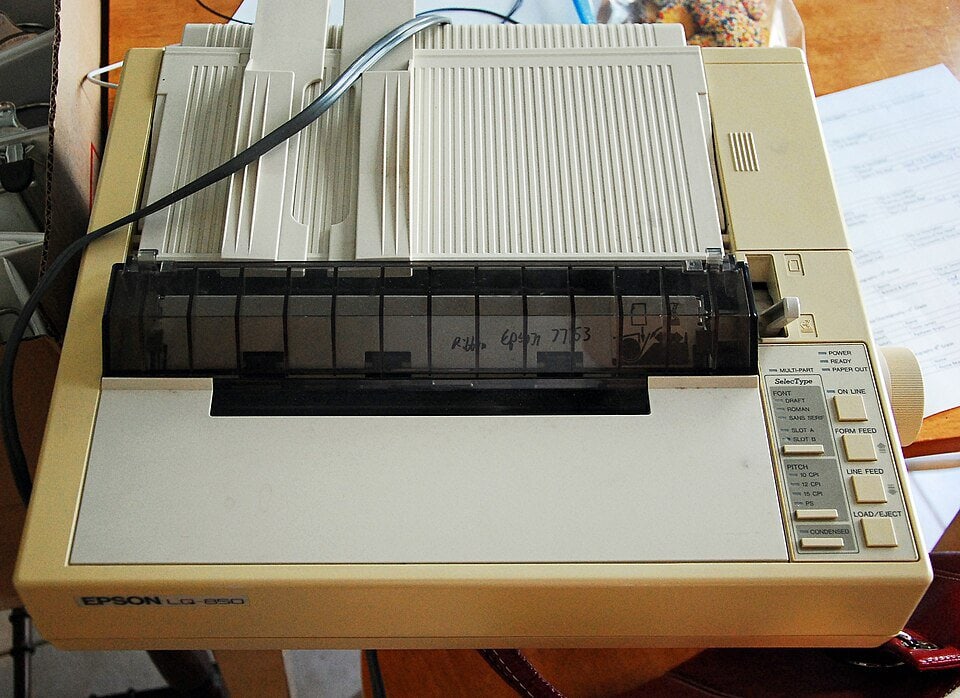
Epson LX-800 Dot Matrix Printer
The earliest Seiko printers were mini-printers designed for (and incorporated in) calculators, with the first being called the EP-101 (Electronic Printer – 101), being launched in 1968. The EPSON brand was then devised in the mid 1970s. (son of Electronic Printer) with Epson America Inc. being established in 1975.
With the very first 80 column dot-matrix printer being released by EPSON in 1978, EPSON aimed at the emerging computer market, targetting the Commodore PET and other early computers. In order to help programmers to control the output of these printers, EPSON devised the ESC/P programming language, which consists of a series of ESCape sequences: the ESC character, followed by a letter, number or other printable character to choose the command, followed by any parameters.
The ESC/P control codes soon became an industry standard, with many of the other printer manufacturers producing EPSON compatible modes for their own printers, or creating their own control code sequences, which bear a similarity to the original ESC/P codes (particularly when it came to choosing bold, italics, underline etc for font handling).
This probably led to the Epson ESC/P standard being widely accepted as the printer standard to use for home computers, and many industrial machines, particularly as Epson released various serial interfaces for these type of printers, which enabled them to support RS232, current loop and centronics connections dependent on the type of interface installed, such as the Epson 8143, Epson 8145 and Epson 8148 Serial Interfaces.
EPSON ESC/P2 Printers
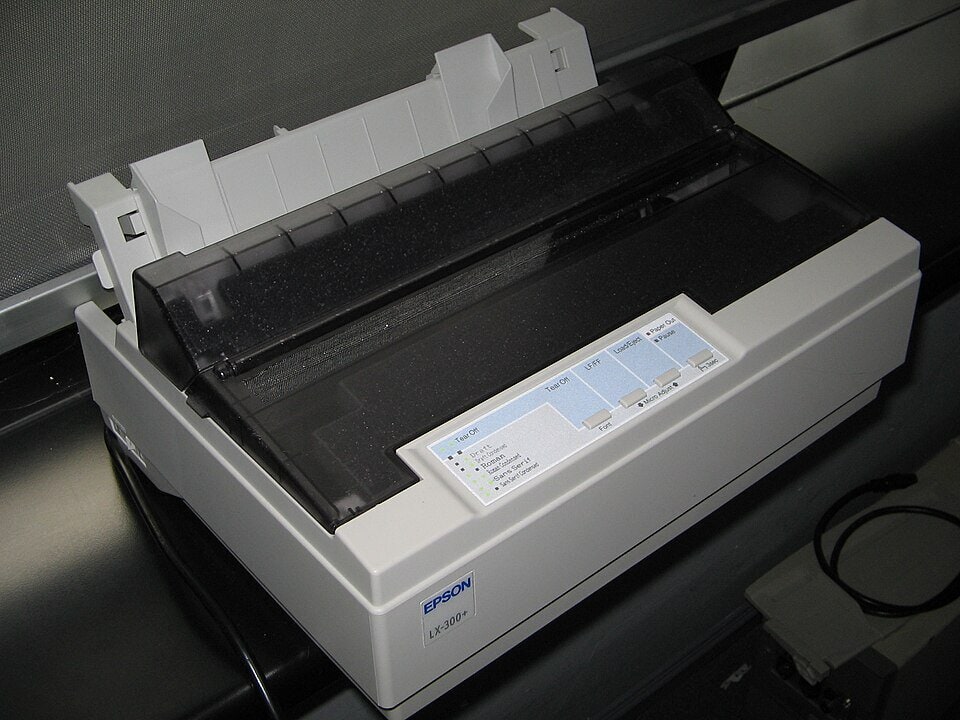
Epson LX-300+ dot matrix printer
The later ESC/P2 standard was released by EPSON in around 1997 for later (level-2) dot matrix printers.
Whereas ESC/P was designed primarily for 9 pin dot matrix printers, it did support colour printing, and up to 720 dpi graphics modes, and could handle the later 24 pin and 48 pin dot matrix printers. By contrast, the ESC/P2 standard came to its fore when used with inkjet printers, where multiple coloured ink nozzles could be used to create high definition images. Whilst backwardly compatible with the ESC/P standard, the ESC/P2 standard adds additional commands for scalable fonts and enhanced graphics printing modes, supporting up to 2880 dpi and new graphics modes which use compression to reduce the amount of data which needs to be sent to the printer.
EPSON ESC/P and ESC/P2 Printer Emulation on the Retro-Printer
Whilst there are several bits of free software to convert Epson ESC/P control codes into an image, they support a limited number of control codes and do not touch on the later ESC/P2 codes. We decided to write the first Retro-Printer emulator for EPSON ESC/P and ESC/P2 codes, and have implemented the vast majority of the codes covered in the Epson Programmers Reference Manuals and by creating our own custom fonts, which are designed to give a good correlation with the original EPSON fonts.
As at the time of writing, we have not yet implemented the downloadable font options, nor the 1440/2880 dpi printing modes (this is actually not covered by any of the Epson documentation which stops at 720 dpi), but presumably the existing codes simply handle the higher density printing.
This EPSON printer emulator actually builds on our first C program written in 1999 for the Sinclair QL Home Computer – which took an original ESC/P graphics printer driver for the ProForma program, and added the higher compressed graphics modes (up to 720dpi) as well as colour options, providing a much quicker printout on later ESC/P2 enabled printers – the source code for that can be downloaded from Github.
By way of interesting comment, the Epson emulator we created for the Retro-Printer module represents our second C program! Not many people can claim that their first program in a new computer language was a printer driver!
EPSON ESC/Page Laser Printers
Some of the later EPSON pinters use the ESC/Page range of control codes. A specific customer asked us to emulate an EPSON LP-S300 laser printer, which according to the manual, uses the ESC/Page and ESC/Page+ control codes. Unfortunately, EPSON have not been forthcoming with support information for this, saying that the information is for internal use only.
We have however, found an over of the ESC/Page control code language (which is a lot different to the more common ESC/P and ESC/P2 standard); and were surprised to see that the codes are NOT what were being used by the LP-S300 laser printer!
EPSON LP-S300 Laser Printer Emulation on the Retro-Printer
By utilising copies of the printed output, and analysing the raw data captured by the Retro-Printer module, we have been able to reverse-engineer the printer control language used by the EPSON LP-S300 laser printer, or at least the key commands used to draw graphic images on the page. This enabled us to develop an emulator which simulates the LP-S300 printer for one specific client. However, it will need more development to address the wider control code set if we come across any other instances where this Japanese printer remains in use.
HP PCL Printers
Created by Hewlett-Packard in the USA, the company dates from the 1930s having originally focussed on a low distortion frequency oscillator (the HP200A) which was used in Walt Disney’s animated film Fantasia. They are now probably best known for their range of HP computers and printers.

HP9866A Printer – 1970s
Hewlett-Packard released their first dot matrix printer, the HP 9866A in 1972. Capable of up to 250 lines per minute, this supported 80 characters per line and 6 lines per inch, with a plot mode of up to 400 dots per row (and 60dpi). Unfortunately, it predates the advent of the HP PCL printer codes, so we cannot emulate this at present (unless someone can provide the details of how it worked).
The first HP Laser printer (the 2680A) was released in 1980. The HP PCL programming language was created for use with its LaserJet series, with PCL1 being introduced in 1984 on the HP ThinkJet 2225. PCL1 provided basic text and graphics printing with a maximum resolution of 150 dpi. It then went through various enhancements with PCL3 introducing 300dpi and support for bitmap fonts, with most HP dot matrix printers and inkjets from the 1980s and 1990s supporting either PCL3 or PCL5.
The PCL programming language is similar in some ways to the EPSON ESC/P2 codes, using a series of escape characters to program the print-head, although it tends to use at least 2 characters after every ESC command to specify what the printer needs to do, followed by one or more parameters.
Many of the inkjets and laser printers created towards the end of the 1980s support HP (or LaserJet) compatible modes. The LaserJet series expect HP PCL printer codes contained within a PJL wrapper, which has much more limited support.
Thankfully, all of the PCL programming languages (prior to PCL6) are backwardly compatible, which means that HP printer emulation is much easier than Epson emulation.

HP 7470A Pen Plotter
HP GL Plotters
As well as the more common range of PCL based printers, HP have made a large number of Pen Plotters over the years, starting with flat-bed plotters in 1968. These flat-bed plotters held the paper whilst an arm moved over the paper containing the pens. This meant that the printer had a large footprint, but with printers in the 1970s managing a maximum resolution of 72 to 100dpi, the plotter has a major advantage (even HP’s earliest digital pen plotters could produce a line resolution equivalent to 1000dpi).
Again, we cannot simulate these early plotters (as we do not have the technical programmers details required), however, HP soon moved onto Pen Plotters where the paper was fed through the machine, similar to a modern printer, such as the HP 7470A Pen Plotter. Until 1987, pen plotters were also the only cost-effective method of getting color output from computers – as the pen plotters use a cartridge which contains a small number of pens (or crayons) for multiple colours – the cartridge then spins around to select the chosen pen to provide output in a specific colour.

HP C2847A DesignJet 600 Plotter
A later large format inkjet was then produced based on the pen plotters, these are the DesignJet series of plotters which are often still used for architect’s drawings and can handle pages up to page size A0 (36″ width). However, the sheer size and need to send drawings electronically are now impacting on the plotter market as this type of plotter is being retired (although they are still used in the advertising industry for producing posters and wraps).
These later pen and ink plotters use a different language to the HP PCL printers, they use HP-GL (HPGL), which is more akin to Turtle Graphics, being a series of two letters followed by any parameters, such as PU (Penup), PD (Pendown) and MV (Move to X,Y position).
HP PCL and HP-GL Emulation on the Retro-Printer
In contrast to the other printer emulators, we decided to use what is probably the best known Linux based program GhostScript to emulate the HP PCL Printer. We supply a simple public domain script which monitors for new raw data files and then passes the captured data to the GhostPCL program for conversion to a PDF file, passing the various page parameters at the same time. For output containing a PJL Wrapper, designed primarily for DeskJet printers, we needed to add some code to strip out the PJL Wrapper, as this is not understood by GhostPCL. It does have the benefit also that we can use that Wrapper to spot the end of a print job and trigger the conversion at that point.
We adopt a similar approach for HP-GL Pen Plotters, using a public domain Linux based program to convert the HP-GL codes into a PDF.
IBM ProPrinter Printers

IBM ProPrinter 4201
The US based compay, IBM (International Business Machines), is one of the oldest information technology companies in the World, being able to trace its history back to 1911 when the Computing Tabulating Recording Company was formed. IBM introduced industry to the world of computers in the 1950s and 1960s by launching its range of mainframes, and the early 1980s launched its range of personal computers to an eager public.
To complement its range of computers, IBM launched a range of printers, called the IBM Peronal Printer and the IBM ProPrinter, originally based on a 9 pin dot-matrix standard, with up to 200 characters per second printing. The printers were eventually spun-off into Lexmark who continue to produce printers today.
The IBM ProPrinter became a popular standard, with many EPSON printers and printronix printers adding IBM ProPrinter emulation as an option.
IBM ProPrinter Emulation on the Retro-Printer
Although many of the ESCape code sequences are similar to the EPSON standard, as with all of these printer variants, there are specific code sequences for the IBM range of printers, and changes to the character set also which we have implemented on our IBM ProPrinter II emulator.
Mannesmann Tally Printers

Mannesmann Tally Line Printer
Formed in 1979 by merging leading line printer company Tally, with the dot matrix printer specialist company, Mannesmann Präzisiontechnik, Mannesmann Tally developed a range of well-respected high speed impact printers for industry and for the home.
Mannesmann Tally merged with GENICOM to become TallyGenicom in 2003, and were eventually acquired by Printronix.

Mannesmann Tally MT80 Dot Matrix Printer
In 1986 the Mannesmann Tally high speed line printers were using their own printer control codes (MT600 mode) but as the market moved on, later line printer models supported a wide range of emulations, such as Epson ESC/P, Printronix, IBM and HP, whereas the home printer market (such as the MT80 which we used at the time) supported Epson ESC/P2 and IBM emulation modes.
Interestingly, the MT660 parallel interface which is used for connecting a PC to the MT600 supports both a standard centronics interface and the Dataproducts interface using a different cable to the board, which allowed it to directly compete with the Printronix range of line printers.
Mannesmann Tally MT600 Emulation on the Retro-Printer
The first challenge we had when developing a MT600 emulation mode, was that the centronics cable being used by our customer had very low signal strengths (less than 2v) which meant that we struggled to capture the data and certainly there was no apparent patterns to it. The customer decided to reduce the length of the cable and resolder it, at which point we could see at least some plain text surrounded by control codes. Finding a manual was also then problematic, as Printronix no longer had any programming information on the MT600 printer codes.
Thankfully, we managed to track down a manual for the MT660 parallel interface, which provides a full explanation of the MT600 printer codes and has enabled us to reverse engineer an emulator.
Compared to other emulators, the programming for this one was slightly odd in that several commands consist of an extended escape code, then a series of numbers which can optionally be separated by a semi-colon and then terminate in a letter to indicate what the command does! The graphics mode is also unusual in that it only uses 6 bits per character, with the 7th bit used as a control code. The 8th bit is unused in graphics mode, but in text mode, it can optionally be used to switch between the two standard character sets.
This has enabled us to develop a fully functional emulator, which (in common with the Printronix Printer emulators) is actually being used in conjunction with commercial flight simulators.
Dascom / Tally T2340 Emulation on the Retro-Printer
When we came across the later Dascom / Tally T2340 printer, the specifications state that this printer offers emulation modes for Epson ESC/P2, IBM ProPrinter and HP PCL. However, further investigation meant that you could not simply choose this as an emulation mode for the Retro-Printer.
This range of printers actually implement a set of Mannesmann Tally Printer Language (MTPL) control codes, which allow things such as paper movement, font size and style setting and more. These commands all start with a sequence which allows them to co-exist with the other emulation modes, and there is also a MTPL command to determine which emulation mode should be used (so that printing can use:
- MTPL
- MTPL + Espon ESC/P2
- MTPL + IBM ProPrinter
- MTPL + HP PCL
As such, we had to create a new Retro-Printer emulator, which can encompass all four modes if required. So far, we have only implemented the first two modes, but can implement the other modes if required.
Printronix Printers

Printronix P300 Line Printer
Formed in 1974, Printronix was an early pioneer, developing the first dot-matrix printer technology and launching its first high speed line printer, the P300, a 300 line-per-minute (LPM) prototype line printer which could handle multi-part forms, and print graphics (as it was not purely character based).
This printer was also sold under the Dataproducts brand name, and generally used an unusual DB-50 way centronics port (with three rows of pins) for which a special Dataproducts adaptor is required to convert this to a standard 36-way centronics port.
By 1977, sales of the P300 had reached 300 units per month and was being used by a wide range of industry mainly for use with mainframes. There are still companies using the original Dataproducts P300 today which shows its robustness as a printer.

P600 Line Printer
The company continued to improve its product offering and launched the higher speed P600 in 1978 (capable of printing 600 lines per minute, doubling the speed of the P300).
By 1984, Printronix had acquired Data Printer, Inc. which added further products to its portfolio (a high-end, 1,200 lines per minute printer and then a 2,000 lines per minute model), boosting Printronix sales, from $78 million in 1983 to more than $116 million in 1984.
Unfortunately, with the emerging growth of the home computer market and the competition from EPSON, Printronix struggled to keep pace with the market, despite producing IBM’s range of printers and even HP’s line printers in the 1990s and remains largely unknown outside of industry.
Seiko STP Thermal Printers
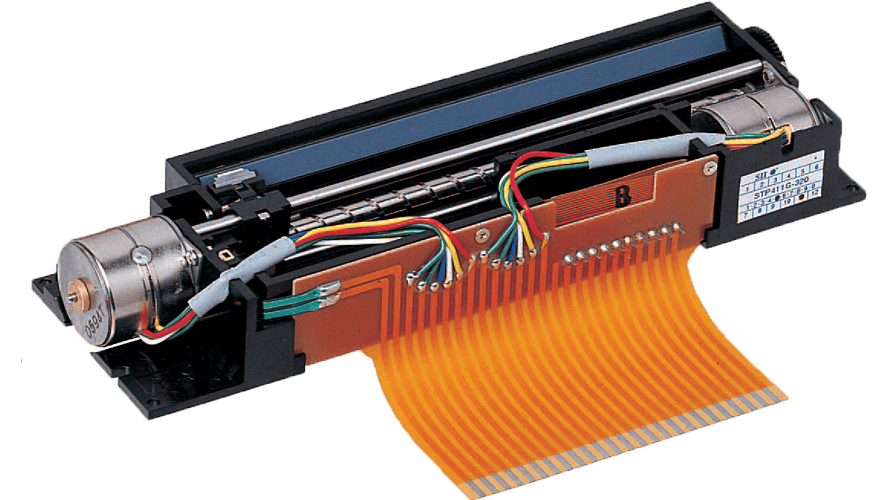
Seiko STP Printer
SEIKO have also released a series of bare-bone thermal printers for use in industrial machines and kiosks.
The STP series of thermal printers are designed to give high reliability and performance at low cost. They offer speeds of up to 1.9 character lines per second but are sold without a case and are coupled with a Seiko interface board (such as the IF4112-GCB) which takes the serial and parallel input and sends the necessary commands to the printer.
This presents two problems for industry – not only are the printers themselves in short supply, but the actual interface boards are also no longer manufactured (although a third party company, Parasysco did make a replacement 4112 board, that is too out of production).
Seiko STP Emulation on the Retro-Printer
We worked closely with a US based company who wished to extract the data being sent to the Seiko STP printers electronically for logging purposes. The starting point was to overcome the cabling issues, which we did by creating an STP specific 20 pin IDC header to 25 pin D port parallel port. This enabled us to capture the data and create an emulation program to simulate the printer (the main issue here was then getting the printer to accept data from the Raspberry Pi which we have still not resolved).
Thankfully in this instance, the Seiko STP range of printers use escape sequence control codes similar to the EPSON ESC/P language for controlling the printed output. We were then able to parse this data and extract specific settings which we could write to a cloud based SQL database for further processing by the client.
Siemens PT88 Printers

Siemens PT88 Printer
Siemens are probably one of the best well-known companies in industrial automation, hvaing released its first automation systems trademark in 1958 (SIMATIC). By 1979, Siemens had launched the its first failsafe programmable logic controller (the SIMATIC S5 PLC series) which reduced switching times and enabled more complex and faster production processes. The engineering software STEP 5 was also released to enable the quick creation and modification of PLC programs.
By 1984, this culminated in the SIMATIC S5 U PLC which could handle around four million transistor functions, creating a very powerful industrial automation tool. However, with programmers needing the ability to create reports, Siemens then launched its own CP523 serial printer interface and dedicated printer, the PT88 which is a 9 pin dot matrix printer, similar in appearance to the EPSON printers of the day, but with only a serial interface (non-standard).
The later S7 PLCs offer a standard RS232 interface, which will work with any ASCII compatible printer, although these are now harder and harder to find, and therefore programmers tend to create the reports through the HMI interface, which allows for more standard Windows printer drivers to be used.
Siemens PT88 Emulation on the Retro-Printer
Emulating the Siemens PT-88 line printer presented somewhat of a challenge. Whilst they were helpful, Siemens had very little information on the PT-88 and no details of the control codes it supports. The software for the S5 PLC had been written to send status messages during a process to the printer, but as the process could take anywhere from 20 minutes to 5 hours, we had to develop a different approach as to when we would trigger the creation of a PDF file.
We worked with the customer to connect the Retro-Printer using a custom serial to centronics interface, in order to initially capture the output from the cleaning process so that we could determine what printer control codes were in use and write the emulator specifically to handle those control codes. We then replicated the output in our offices, and identified that the Cp-523 was sending only 7 bit data, with minimal control codes.
Our PLC programming experience then proved useful, as we were able to examine the PLC code to determine all of the potential messages which could be output by the system to the serial card. Having done this, in conjunction with the customer we were able to determine specific phrases which indicate the start and end of a print job.
Star Micronics Printers

Star Micronics SP700 Printer
Star Micronics was founded in 1947 as a precision processor of miniature components, but moved into manufacturing printers specifically for the Point of Sale (POS) market in the 1970s.
Star have released a wide variety of POS printers over the years, including bare-bone printers such as the BD100 and BD500, and complete stand-alone printers SP2000, SP500 and SP700 some of which come equipped with serial or parallel interface options making them ideal for the Retro-Printer (although some later variants also support ethernet and USB connections). They also released a range of Slip Printers, such as a the SP298, which allows for printing cut sheet media such as pre-printed company branded multi part receipts or forms / cheques.
These printers continue to use dot matrix technology, and unlike many of the current POS printers, these do not use the standard ESC/POS printer control codes, but use escape sequences which have quite a lot in common with the EPSON ESC/P specification. It should however be noted that some of the printers do support an ESC/POS mode, for compatability, although we do not currently have an ESC/POS emulator of our own).
Star Micronics SP700 Emulation on the Retro-Printer
We have been able to implement much of the functionality of the Star printer commands (in the SP-700 POS printer and the emulator should also suit the other Star Micronics printers (BD100, BD500, SP298, SP2000 and SP500) provided that they can be connected using serial or centronics connections, as they all appear to support the same (or a subset of the SP700 commands).
Tandy DMP Printers

TRS-80 Model 1 Computer
Having started as a leather goods company in 1919, Tandy Corporation branched out into electronics through the purchase of RadioShack in the 1960s, and eventually entered the realm of personal computers in 1977 with the launch of the TRS-80 and the later colour computer (CoCo).
The TRS-80 was a relative success and introduced many businesses into the world of personal computing (compared to using a mainframe and terminals), with Tandy having over 50% of the market share at one time.
Of course, businesses required the ability to printout orders and invoices, so Tandy developed their own line of dot matrix printers, including the DMP-100 released in 1976. These early Tandy printers used their own sets of control codes, but by the time Tandy released the DMP-135, the printers supported EPSON and IBM ProPrinter II emulation modes.
Tandy DMP Emulation on the Retro-Printer
We have created our print emulator based on the DMP-105 control code set, and will extend this to cover the extra commands introduced by the DMP-130. The IBM ProPrinter II and EPSON modes are already covered by our Retro-Printer emulators.
The DMP-105 emulator uses ESC character sequences for both text and graphics printing, and therefore allows our main library to create a PDF for printing.

